Appearance
Dashboard
The dashboard is the first page after signing in. It shows how the selected implementation year stands today. Change the year with the selector at the top right.
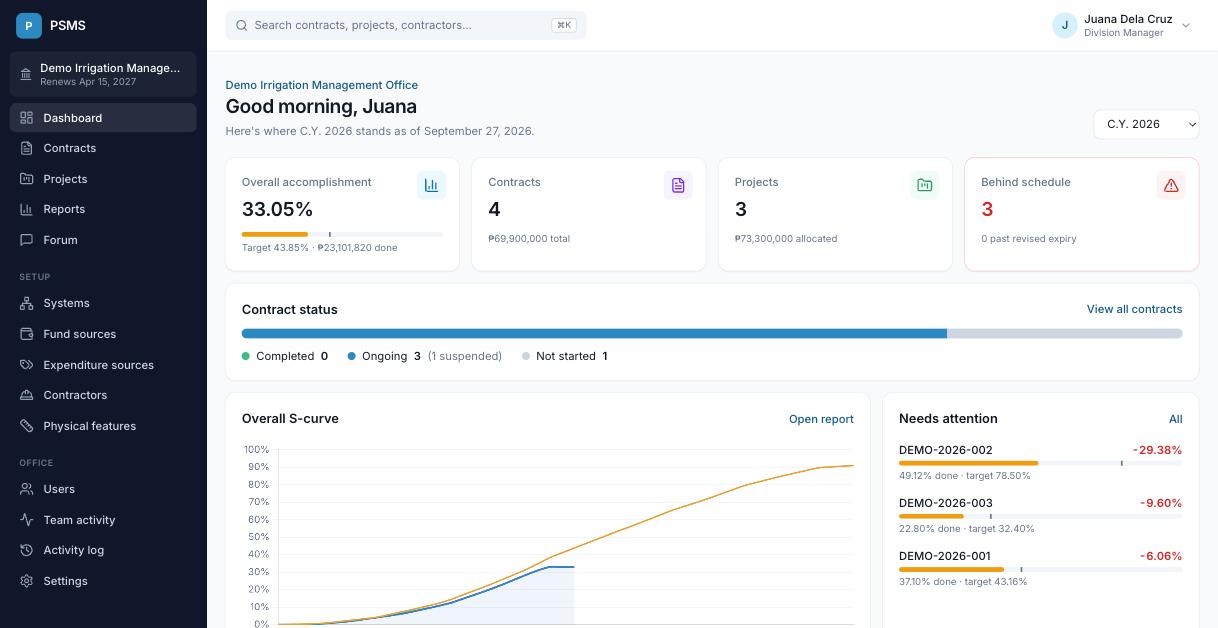
| Card | What it shows |
|---|---|
| Overall accomplishment | Value of work done ÷ total contract amount, with the target marked on the bar |
| Contracts | Number of the year's contracts and their total (revised) amount |
| Projects | Number of the year's projects and their total allocation |
| Behind schedule | Contracts with negative slippage, and how many are past their revised expiry |
Below the cards:
- Contract status: how many contracts are completed, ongoing (and how many of those are suspended) and not started. Click a label to see those contracts.
- Overall S-curve: planned vs actual accomplishment for all of the year's contracts together, each weighted by its amount.
- Needs attention: the ongoing contracts furthest behind schedule.
- Where attention is needed: a map of the year's overdue, behind-schedule and suspended contracts.
- Recent activity: the latest changes in your office.
Every card and label is a link to the matching list or report.
Which contracts count
The dashboard and contract reports include contracts that have a contractor, and leave out work done by administration (recorded under a contractor named "Administration"). The contracts list shows everything.