Appearance
Forum
The Forum is a place to ask questions and share tips with PSMS users from all offices. Everyone with a PSMS account can read and post, whatever their role.
The forum is shared
Other offices can read everything here, and posts show your username. Don't post contract amounts, names of contractors, personal information or anything confidential.
Browsing
Open Forum in the sidebar. Posts are listed newest first, 30 per page, each with its category, author, when it was posted and last replied to, and its reply and like counts. Use Categories on the left (along the top on a phone) to show one category, or All posts:
- Announcements: news from the PSMS team, such as new features and maintenance.
- Usage Queries: "how do I...?" questions about using PSMS.
- Feature Requests: ideas for improving PSMS.
- General Discussions: anything else.
The categories are managed by the PSMS administrator.
Posting
- Click New post (if you're viewing a category, it's chosen for you).
- Pick the category, give the post a clear title and write your message. It's plain text: line breaks are kept, but there's no formatting or attachments.
- Click Post.
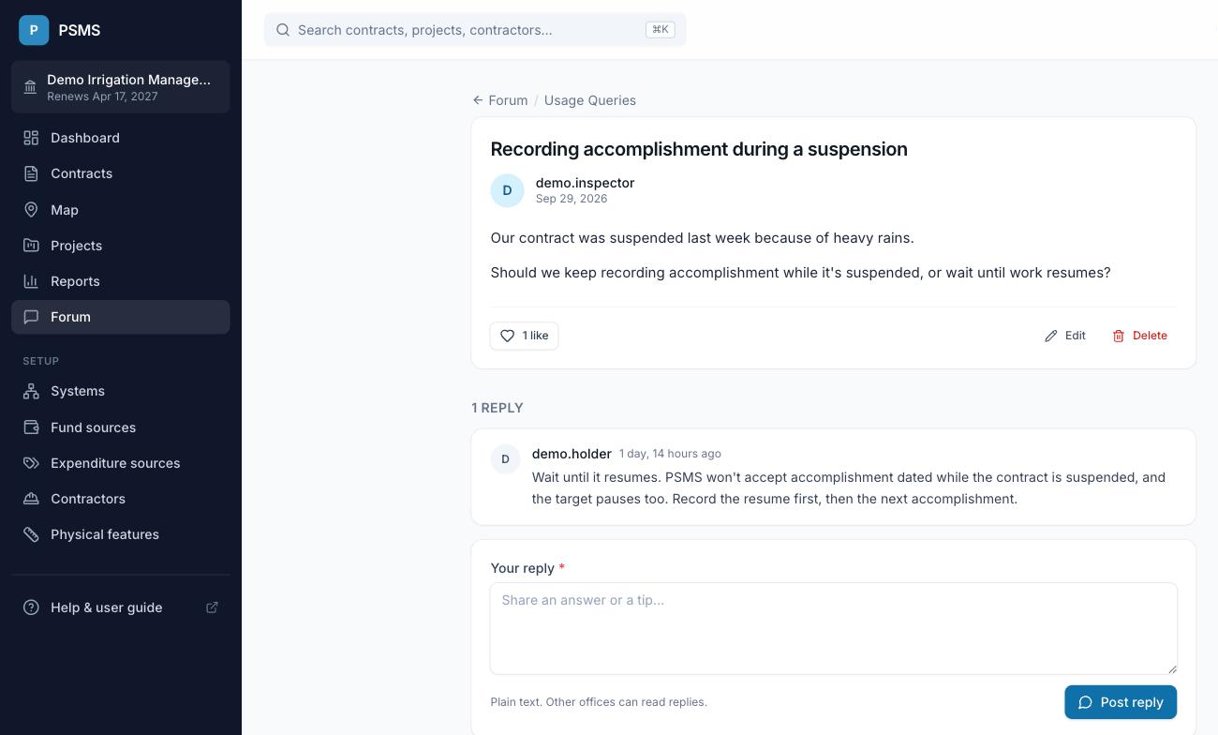
Good posts say what you were trying to do, what you expected and what happened, for example "Recording accomplishment during a suspension" rather than "Help".
Replying and liking
- Open a post to read the replies, oldest first, and type yours in the box at the bottom, then click Post reply.
- Click the heart under a post to like it; it turns red. Click again to take your like back. The number shows how many people liked it.
Editing and deleting
- You can edit or delete your own posts with the links under the post. Deleting a post also deletes its replies and can't be undone.
- You can delete your own replies; replies can't be edited, so delete and post again to correct one.
- The PSMS administrator can edit or remove any post or reply.
Need help from the PSMS team?
Post in Usage Queries. For anything about your office's own data or subscription, contact the PSMS administrator directly instead of posting it in the forum.